


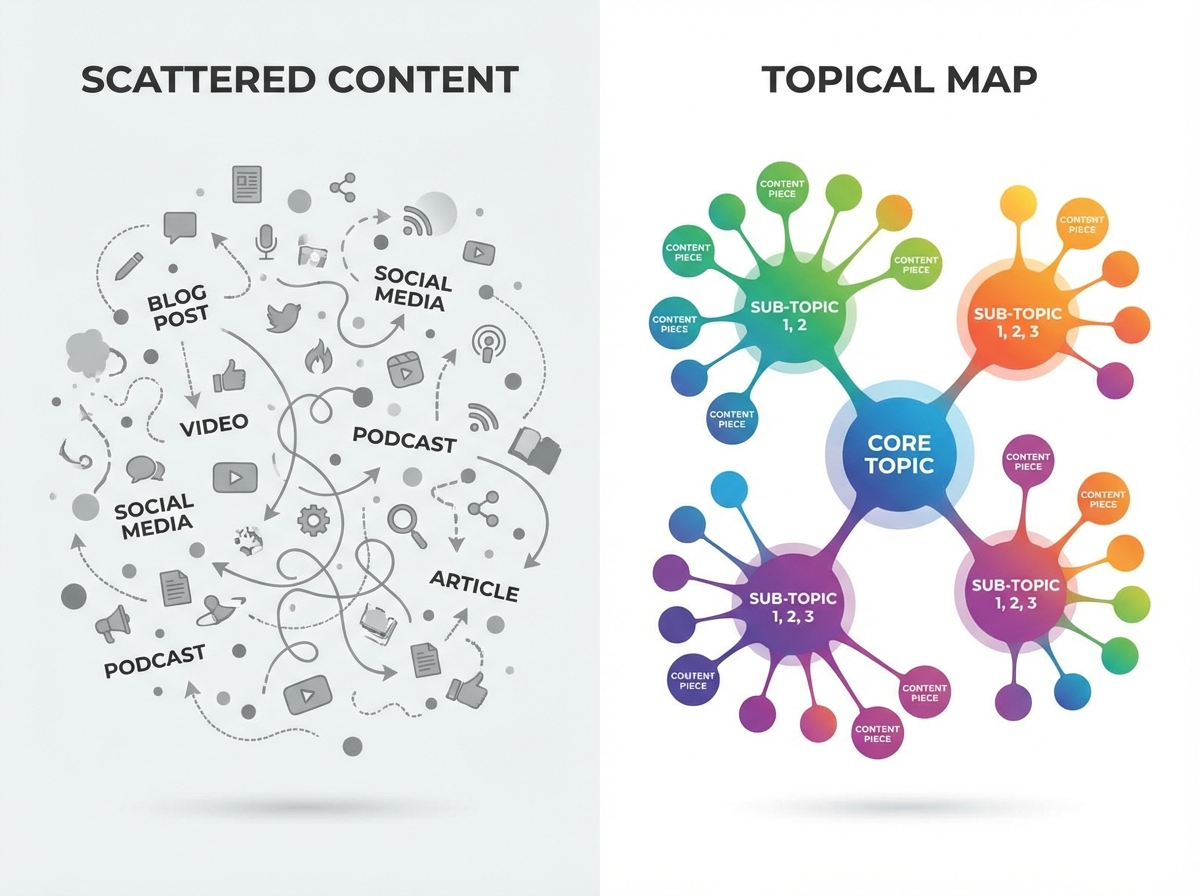
Here's a pattern I see constantly. A company publishes 50 blog posts over six months. Topics are all over the place. Some rank, most don't. There's no internal linking strategy. No hierarchy. No plan for how post #23 supports post #7. Then they wonder why Google treats their site like a grab bag instead of an authority.
A topical map generator fixes this. It takes your core topics and maps out every subtopic, supporting article, and internal link you need to build genuine authority in your space. Instead of guessing what to write next, you follow a blueprint that shows exactly which content fills which gap and how everything connects.
The difference between sites that rank for competitive keywords and sites that don't usually comes down to this. Not better writing. Not more backlinks. Just a smarter structure. Let me show you how to build one.
What Is a Topical Map (And Why Should You Care)?
A topical map is a visual plan that organizes all your content around core topics and their subtopics. Think of it like a tree. Your main topic is the trunk. Major subtopics are branches. Individual articles are leaves. Everything connects back to the trunk through internal links.
Why does this matter? Google's algorithm has gotten extremely good at recognizing topical authority. When your site covers a subject comprehensively with well-linked, logically organized content, Google trusts you more on that subject. One thorough article on "email marketing" is good. Twenty interconnected articles covering email marketing strategy, tools, automation, deliverability, templates, and measurement? That's topical authority. That's what ranks.
But here's the part that most topical map guides skip entirely. Topical authority doesn't just help you rank on Google anymore. AI assistants like ChatGPT and Gemini also use topical authority signals when deciding which brands to cite. If your site covers a topic with depth and structure, language models recognize that pattern. Your chances of getting cited in AI-generated answers go up significantly. A topical map is now a dual-purpose asset.
How a Topical Map Generator Works
A topical map generator automates the research and organization that would otherwise take days of manual work. You give it a seed keyword or core topic, and it returns a structured hierarchy of related subtopics, keyword clusters, and content suggestions.
The best generators do three things. First, they analyze what's already ranking for your topic to identify the full scope of subtopics Google considers relevant. Second, they cluster related keywords together so you're not creating five articles that compete with each other for the same search intent. Third, they suggest a hierarchy showing which topics should be pillar pages and which should be supporting articles.
Some popular options include TopicalMap.ai (which generates complete keyword lists with search volume and intent data), Search Atlas (which creates hundreds of article suggestions from a single seed keyword), and FatJoe's generator (which maps level 1 and level 2 subtopics). Free options like Logicballs exist too, though they're more limited in depth.
You can also use ChatGPT or Claude to generate a starting framework. Ask something like "Create a topical map for a website about [your topic], including pillar pages and supporting article clusters." The output won't be perfect, but it gives you a solid starting point to refine with keyword data.
Building Your Topical Map: The Step-by-Step Process
Whether you're using a generator tool or building manually, the process follows the same logical steps.
Step 1: Define Your Core Topics
Start with three to five core topics that align with your business. These should be broad enough to support multiple subtopics but specific enough to your expertise. If you sell project management software, your core topics might be "project management," "team collaboration," "remote work productivity," and "agile methodology."
The mistake most people make here is going too broad. "Business" isn't a core topic. "Project management for marketing teams" is. Specificity is what builds authority. You'd rather be the definitive resource on a narrow subject than a mediocre resource on everything.
Step 2: Map Out Subtopics and Keyword Clusters
For each core topic, identify every subtopic a searcher might explore. Use your topical map generator, keyword research tools like Ahrefs or Semrush, and Google's "People Also Ask" section to find these.
Group related keywords into clusters. "Best project management tools," "project management software comparison," and "top project management platforms 2026" all serve the same search intent. They belong in one article, not three separate posts competing against each other.
For each cluster, note the search intent (informational, commercial, transactional) and the keyword difficulty. This helps you prioritize. Start with low-difficulty clusters where you can win quickly, then work toward harder ones as your topical authority builds.
Step 3: Design Your Content Hierarchy
This is where most people stop at "pillar page + blog posts" and call it done. A proper hierarchy has more nuance.
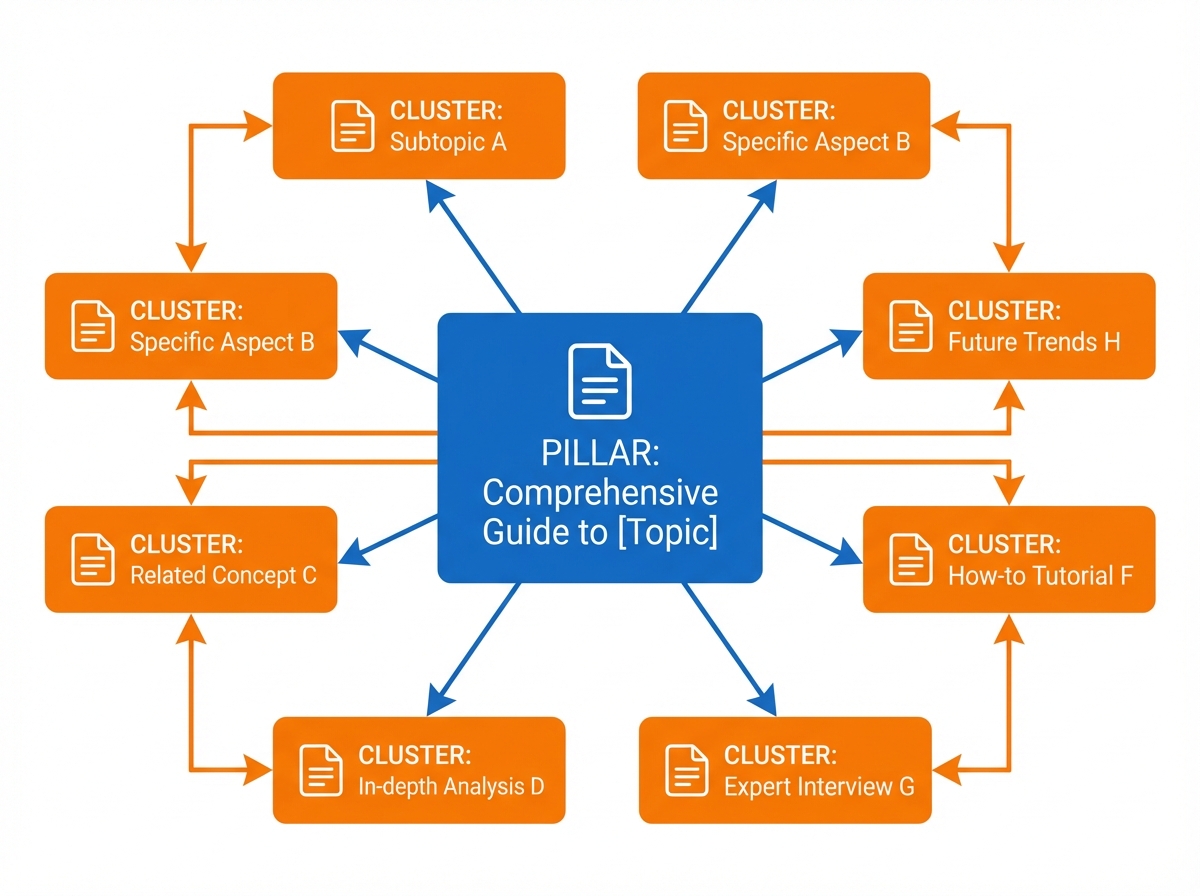
Pillar pages cover your core topic comprehensively. They're typically 3,000-5,000 words and link out to every supporting article. Think "The Complete Guide to Project Management." These target your highest-volume, highest-competition keywords.
Cluster articles cover specific subtopics in depth. They're 1,500-2,500 words and link back to the pillar page plus cross-link to related cluster articles. Think "How to Run Effective Sprint Planning Meetings" or "Project Management Tools for Remote Teams."
Supporting content addresses very specific, often long-tail questions. FAQ posts, comparison articles, how-to tutorials. These are 800-1,500 words and link up to the relevant cluster article. Think "Asana vs Monday.com for Marketing Teams" or "How to Create a Gantt Chart in Google Sheets."
Every piece connects to the others through internal links. That's the structure that signals topical authority.
Step 4: Prioritize by Business Impact
Don't just publish in order of keyword difficulty. Prioritize content that serves your business goals. Some questions to ask:
Which topics directly relate to what your product solves? Those articles can naturally mention your solution. Which topics attract buyers versus browsers? Commercial-intent keywords often convert better even with lower volume. Which topics have content gaps you can fill? If every competitor has a basic overview but nobody has a detailed comparison, that's your opening.
A topical map is a content strategy, not a publishing schedule. The order you execute matters.
Step 5: Build Internal Links Deliberately
Internal linking is what transforms a collection of blog posts into a topical map. Without it, you just have articles. With it, you have architecture.
Every cluster article should link to its pillar page. Every pillar page should link to all its cluster articles. Related cluster articles should cross-link to each other. Supporting content links up to the relevant cluster article.
Use descriptive anchor text. "Learn more about sprint planning" beats "click here." The anchor text tells both Google and AI models what the linked page covers, strengthening the topical relationship between your content.
Topical Maps for AI Visibility (The Part Nobody Talks About)
Here's where topical maps become even more valuable than most guides suggest. AI assistants are building their own model of which sources are authoritative on which topics. And the signals they use? Very similar to what makes a good topical map.
When ChatGPT encounters your site through its retrieval process, it doesn't evaluate individual pages in isolation. It evaluates the depth and breadth of your coverage on a subject. A site with one article about project management looks like a casual mention. A site with a pillar page, fifteen cluster articles, and detailed supporting content on every aspect of project management looks like an authoritative source. The AI is more likely to cite the second site.
This means your topical map serves double duty. It builds Google authority AND AI citation potential simultaneously. Platforms like Gondla help you track both dimensions, showing you not just how your content ranks on Google but whether AI assistants are actually citing your content when users ask related questions.
The brands building structured topical maps now are establishing themselves as the default AI citations in their categories. That advantage compounds over time as AI models learn which sources consistently provide comprehensive, reliable information.
Common Topical Map Mistakes
Going wide instead of deep. Covering ten topics superficially beats covering none, but it won't build authority. Better to dominate two or three topics completely than to skim the surface of ten. Depth signals expertise.
Ignoring search intent. A topical map organized purely by keywords misses the point. Group content by what the searcher actually wants. If three different keywords all lead to "I want to compare tools," they belong in one comparison article, not three separate posts.
Building the map but skipping the links. I see this constantly. Someone creates a beautiful topical map, publishes all the content, and then forgets to connect it with internal links. Without links, it's just a bunch of blog posts. The structure is what creates authority.
Never updating. Your topical map should evolve. New subtopics emerge. Old content gets stale. Competitors publish something better. Review your map quarterly, identify gaps or outdated pieces, and keep building. Topical authority is maintained, not achieved once.
Creating content nobody wants. Just because a keyword exists doesn't mean it's worth writing about. Every piece in your topical map should serve a real audience need AND align with your business goals. Filter ruthlessly.
Frequently Asked Questions
What is a topical map generator?
A topical map generator is a tool that takes a seed keyword or core topic and automatically generates a structured hierarchy of related subtopics, keyword clusters, and content suggestions. It automates the research and organization process that would otherwise require hours of manual keyword research and competitor analysis. Popular options include TopicalMap.ai, Search Atlas, and FatJoe's generator.
How many articles do I need for topical authority?
There's no magic number, but in my experience you need at minimum a pillar page plus eight to twelve cluster articles to start seeing topical authority effects. Competitive niches might require twenty to thirty interconnected pieces. The key isn't hitting a number but covering the topic comprehensively enough that Google and AI models recognize your site as an authoritative source.
Can I build a topical map with free tools?
Yes. You can use Google's Keyword Planner for keyword research, Google's "People Also Ask" for question ideas, ChatGPT or Claude for initial topic mapping, and a spreadsheet to organize everything. Free topical map generators like Logicballs work for basic mapping. Paid tools save time and provide more data, but the manual approach works if you're starting on a budget.
How long does it take for a topical map to improve rankings?
Typically three to six months to see significant movement, assuming you're publishing quality content consistently and building internal links properly. Some lower-competition clusters might rank within weeks. Higher-competition pillar keywords take longer. The compound effect of topical authority means results accelerate over time as you add more interconnected content.
Should I use a topical map generator or build one manually?
Both work. Generators save significant research time and often surface subtopics you wouldn't have thought of. But they can also suggest irrelevant topics or miss nuances specific to your niche. The best approach is using a generator for the initial framework, then manually refining it based on your business goals, audience knowledge, and competitive analysis. Think of the generator as a starting point, not the final product.
Created with Gondla - Build topical authority that ranks on Google and gets cited by AI.